
Home System Research About Contact Schedule a Demo →

Sentari Build

Draw a house on your computer, then stand inside it at full size on a Meta Quest. Pin it to the real lot in mixed reality, change walls and finishes from inside, and walk it with a client wearing a second headset.

Meta Quest 3 · Quest 3S
Version 1.2 · Meta Horizon Store, early-access channel

The headset app is in early access. Ask for an invite with the email of your Meta account. When you accept the invite, Sentari Build appears in the Store on your headset, and updates arrive on their own.

Request a tester invite
macOS
Desktop editor · Version 1.5.0 · macOS 12 or newer
Download for Mac (Apple Silicon) Download for Mac (Intel)
Not sure which? Apple menu › About This Mac: "Apple M…" is Apple Silicon.
Windows
Desktop editor · Version 1.5.0 · Windows 10 or 11, 64-bit
Download for Windows

Try it free for 14 days. Create an account in the desktop editor with your work email and a password (Settings › Subscription), confirm the email once, and your company's trial starts. After that, a Sentari Build subscription keeps editing on; without one, plans still open, save and export. The desktop editor is optional: you can build a whole house in the headset. Use the desktop for the lot and setbacks, the ADU check, pricing and client proposals, tracing or AI-importing your plans, and PDF export. There is an iPad app too (TestFlight, by invite). Current release: desktop 1.4.0, headset 1.2. See pricing and the pilot.
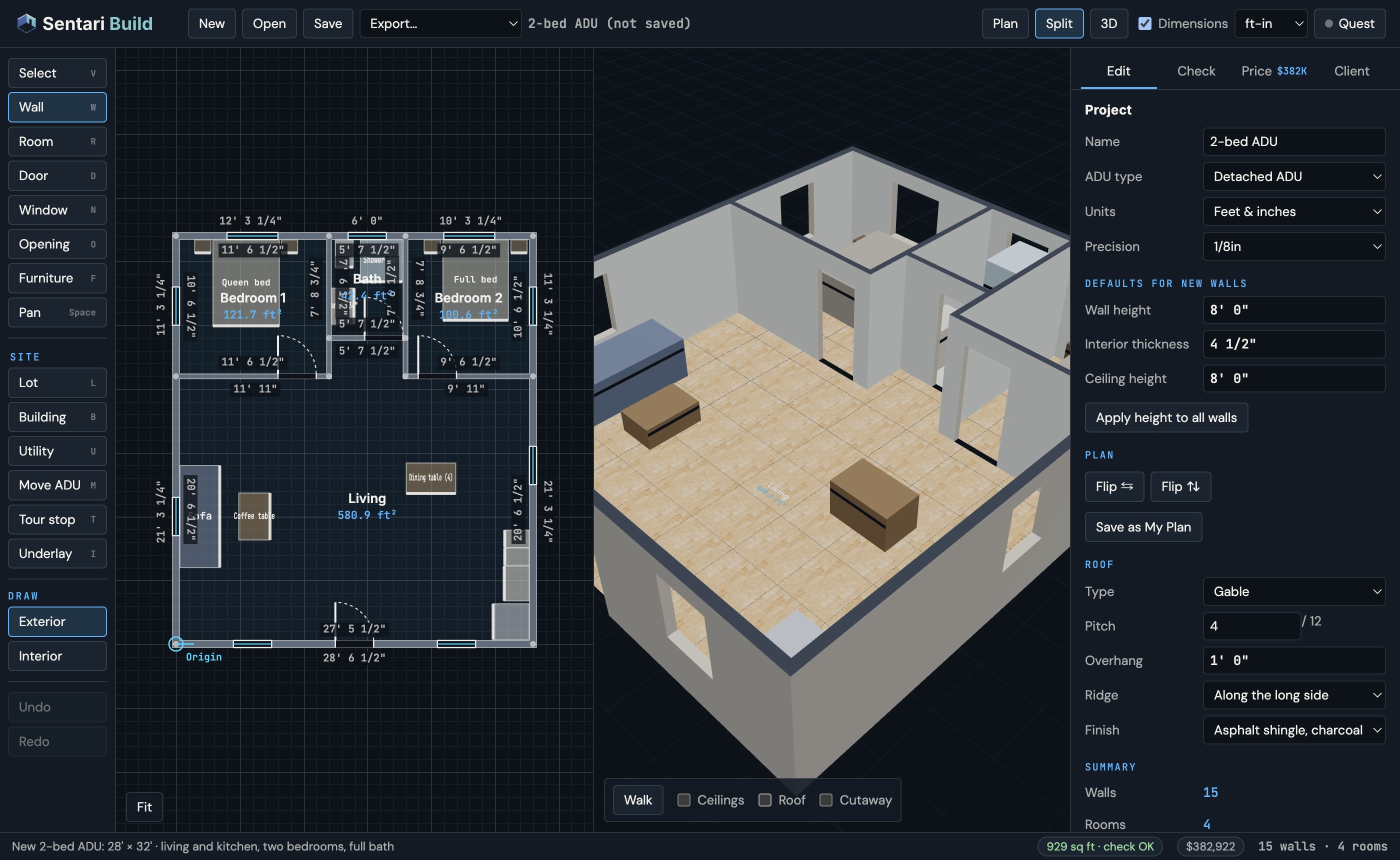
The Sentari Build desktop editor: a 28 by 32 foot two-bedroom ADU in plan view with dimensions on every wall, next to a 3D view of the same house with furniture, and the ADU check and price in the status bar
The desktop editor: plan and 3D side by side, with dimensions on every wall.

Start with a 90-day pilot

Sentari Build is licensed to your company, per kit. A kit is the headset, the iPad and everything a rep carries to a client's yard. Most builders start with a pilot, then keep the kit on a subscription.

Pilot · $3,000

One kit, yours to keep, and 90 days of Sentari Build, plus sales tax on the hardware. We build up to three of your standard plans, put your logo on the proposals, walk you through setting up your own prices, train your team for two hours and come to your first two client visits.

After the pilot · $599 a month

Per kit, or $5,990 a year. Up to five people per kit on the computer and iPad apps. Cancel any time; it runs to the end of the period you paid for. Without a license your plans still open, save and export, and the hardware is yours.

Founding builders · $349 a month

The first five builders who continue after a pilot pay $349 a month per kit, locked for 12 months.

Or try the computer app free for 14 days (downloads above). Prices in Sentari Build are estimates from the plan as drawn, and its ADU checks are rule-of-thumb checks, not a plan review. Full terms: Sentari Build terms.

See the house before it's built

Drawings and renders leave clients guessing. Sentari Build lets them stand in the kitchen, look down the hall and decide, at full size, on the spot where the house will go.

Build anywhere

Start from a studio, 1-bed or 2-bed ADU, or draw your own. Walls, rooms, doors, windows, roofs, furniture and finishes, with dimensions on every wall, on the desktop or in the headset.

On the real site

In mixed reality the house stands on the actual lot or slab, pinned where you put it, and it stays there between visits. Switch to VR to see it finished, furniture and all.

Walk it together

Hand your client the headset and guide the visit from the iPad: rooms, finishes and the price change as they choose. Add a second headset and you both stand in the same house in the same spot.

From plan to walkthrough

Sentari Build runs on your headsets, your computer and your iPad, and they talk over your own Wi-Fi or a phone hotspot. Your plans stay on your devices except what you choose to send: a plan image for AI import, or a proposal you share with a client by link. Your company's price book and monthly usage counts (numbers only) are kept on your company's account. You sign in with your work email and password, which also checks your company's license.

01

Get the headset app

Request a tester invite, accept it, then install Sentari Build from the Store on your Quest 3 or Quest 3S.

02

Draw the house

Start from a template or draw it in the headset. Or install the desktop editor — your computer may block the first launch, see . On the same Wi-Fi, the headset finds the computer by itself; approve its 4-digit code and every edit syncs both ways.

03

Place it on the site

In mixed reality, put the house where it will stand, or line up two of its corners with real marks on the ground. It stays pinned there.

04

Walk it with your client

Outline a safe area in the yard, turn on client view and hand over the headset. With a second headset you can walk it together: on yours open Together › Invite a headset; on theirs, Join a headset. The inviting headset needs Settings › Privacy & safety › Device permissions › Enhanced spatial services turned on.

Your designs stay yours. Projects are saved on your headset, your computer and your iPad. No camera images or room maps leave the headset. What is kept on your company's account, and what a share link holds, is in the privacy policy.

Testing Sentari Build?

Tell us what worked, what didn't, and what you'd need to use it with a real client. We read every message.

Send Feedback Help and Support

Sentari Build — Desktop 1.5.0 · Headset 1.3 · Early access · © 2026 Sentari VR Systems